RCMate
A terminal UI for running, monitoring and managing rclone sync jobs.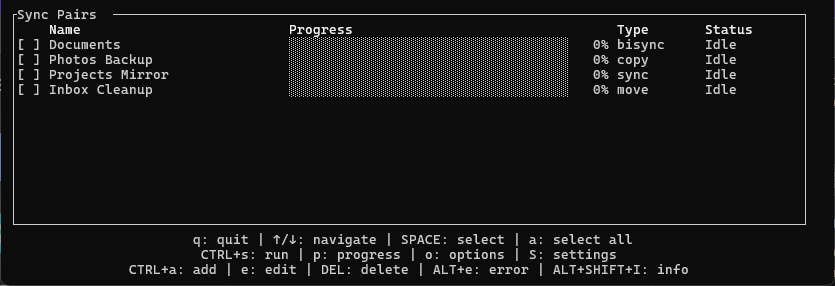
RCMate is a keyboard-driven terminal app for rclone. You describe your sync jobs once in a TOML file, then pick, run and watch them from one screen instead of typing long rclone commands by hand.
What it does
- One list of sync pairs. Each pair has a name, a source, a destination, a type and optional include and exclude filters.
- Four sync types.
sync,bisync,copyandmove, the same operations rclone offers. - Live progress. RCMate talks to rclone’s remote control (RC) API and shows transfer stats, progress bars and per-file progress while a job runs.
- Single files work too. If a source or destination is a single file, RCMate runs the job on its folder with an include filter for that file.
- Edit in the app. Add or edit pairs and their options in a form. Changes are written back to the config file.
- Signed self-update.
rcmate self-updateshows the release notes since your version and only replaces the binary after checking its signature.
Choosing a sync type
| Type | Direction | Deletes | Good for |
|---|---|---|---|
sync | one-way | on the destination, to match the source | an exact mirror or backup |
copy | one-way | never | a backup that keeps deleted files |
move | one-way | on the source, after transferring | moving files off a source |
bisync | two-way | on either side, mirroring deletions | keeping two places in step |
For files where every change matters, such as a password database, use bisync. It detects when both sides changed and keeps both versions instead of silently overwriting one.
Configuration
[rclone]
bin = "rclone"

[[sync_pairs]]
name = "Documents"
type = "bisync"
source = "/local/documents"
destination = "remote:documents"
excludes = ["*.tmp", "node_modules/"]

[[sync_pairs]]
name = "Media backup"
type = "copy"
source = "/local/media"
destination = "remote:media"
The default location is ~/.config/rcmate/config.toml. Command-line options override the config path, the rclone binary, the rclone config, the working directory and the log level.
Keyboard
| Key | Action |
|---|---|
↑ / ↓ | Move the selection |
Space / a | Select one pair / all pairs |
Ctrl+S | Run the selected pairs |
Ctrl+A / e | Add a pair / edit the highlighted pair |
o | Options for the highlighted pair |
p | Per-file progress |
Alt+E | Show the error of the highlighted pair |
q | Quit |
Getting started
Install rclone and set up your remotes with rclone config. Then download RCMate from the releases page, or build it from source with cargo build --release.
Before the first real run of a sync pair, turn on dry_run in the pair’s options to see what would change. A bisync pair needs one run with resync enabled to create its baseline; turn resync off again afterwards.
License
RCMate is written in Rust and licensed under MIT or Apache 2.0, at your option.